|
Auto Shutdown - There is a feature of Auto Power-on & Shut-down that you may find useful. It will allow your computer shut down at specified time automatically.
In order to let your computer auto shut down at specified time, you may:
Right click on the program's tray icon (which is located in the bottom right-hand corner of your screen) to selects Auto Shutdown to get the following window on the pop-up menu. (which is located in the bottom right-hand corner of your screen) to selects Auto Shutdown to get the following window on the pop-up menu.
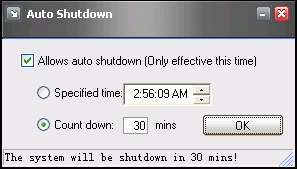
Then, you may tick "Allows auto shutdown" and specify a mode and time or number.
Click OK, now your computer will auto shut down at the specefied time.
|
 |
|
|
 |
 |
 |
 |
Lastest Upgrades: |
 |
 |
 |
 |
| |
 Version 2.84 Version 2.84
Released: 06/06/2017
Platforms: Windows
xp/2003/vista
/2008/7/8/8.1/10 |
|
|
 |
 |
 |
|
|
|
|
|
|
|
SystemRequirement |
|
|
|
|
| |
Windows versions: Microsoft Windows 98/Me/2000/XP/2003
/vista/7
Memory:
64 MB of RAM
Hard drive:
10 MB of hard drive space
Mainboard:
support ACPI |
|
|
|
|
|
|